

An Instagram carousel works when the first slide stops the scroll and every slide after it earns the next swipe. Design every slide at 1080 x 1350 pixels (4:5), keep important text away from the edges, make the cover read in under a second, and give each slide one idea. Use as many slides as the idea needs, up to Instagram's 20, and measure success by saves and sends, not likes.
That's the short version. Below is the full process I use. At Luxury Bazaar, carousels built this way went from 300 to 500 engagements a post to 2,000 to 3,000, and they did a lot of the work as the account grew from 65K to 106K followers.
Why carousels are worth the effort
A carousel gets more than one chance. Instagram has said that if someone scrolls past a carousel without swiping, it may show it to them again later starting on a different slide. A single image doesn't get that second shot.
Carousels are also the format people save. A good one is a small reference: a checklist, a before and after, a guide, a breakdown. People save what they want to come back to, and they send what they want a friend to see. Adam Mosseri, who runs Instagram, has said that "one of the most important signals we use in ranking is sends per reach." A carousel built to be useful or funny enough to send is built for the signal that matters.
The right Instagram carousel size
Use 1080 x 1350 pixels (4:5 portrait). It takes up the most room in the feed, which means more of the screen is yours.
Square (1080 x 1080) still works, but you give away height for nothing.
Landscape (1080 x 566) is allowed and almost always a mistake. It's tiny on a phone.
The first slide sets the shape for the whole carousel. If you mix sizes, the rest get cropped or padded to match.
Your profile grid crops the cover to 3:4. Only the first slide shows on your grid, trimmed at the sides. Keep the cover's important stuff in the center so the grid version still makes sense.
Export JPG or PNG for images, MP4 or MOV for video, and you can mix photos and videos in one carousel.
Specs change, so check Instagram's own help pages before a big campaign. These are current as of 2026.
Leave margins (the safe zone)
Instagram puts your username, the dots that show how many slides there are and sometimes a tag over the edges of the image. Keep text and faces at least 80 to 100 pixels in from every edge. I build my templates with a 90 px margin guide and never break it for text.
Also design your slides to line up. People see the edge of the next slide on some screens and in previews, and a shape or line that carries across the seam is a quiet invitation to swipe.
How many slides should a carousel have?
Instagram allows up to 20. That's a limit, not a goal. The right count depends on the job:
Product or drop: 4 to 7 slides. Hero shot, details, on-body or in-use, price and where to buy.
Before and after or a transformation: 3 to 5. Make the comparison obvious on slide 1.
Tips, list or how-to: 6 to 10. One tip per slide, plus a cover and a closing slide.
Story or case study: 8 to 12. Problem, process, result, with images doing most of the talking.
Photo dump or event recap: 8 to 20. Order it like a story, not by timestamp.
The test is simple: if a slide could be deleted and nobody would notice, delete it. A tight 7-slide carousel beats a padded 12.
Design the cover like a thumbnail
The cover does 90% of the work. It's competing with everything else in the feed, and it's the only slide on your grid. I treat it exactly like a YouTube thumbnail: one idea, readable at phone size, and a reason to swipe.
Cover formulas that work:
The promise: "7 ways to make your product photos look expensive"
The before and after: two images, split down the middle, and nothing else
The mistake: "Stop doing this with your logo"
The reveal: a cropped or blurred image with "wait for slide 5"
The hot take: a short opinion your audience will want to argue with or agree with
The list of numbers: "3 lenses, 1 shoot, 40 product photos"
The question: "Which one would you wear?" over two options
Keep the cover headline to 3 to 8 words. If it needs a subtitle to make sense, the headline isn't done yet.
Type rules for carousel slides
Most carousels fail at the type, not the idea. On a phone, small text is no text.
Headlines: around 70 to 110 px on a 1080 px wide slide.
Body text: no smaller than about 34 to 40 px. If it doesn't fit, cut words, don't shrink them.
Two typefaces, max. One for headlines, one for body. Your brand fonts, every time.
25 to 40 words per slide, at most. A carousel is not a blog post cut into pieces.
Strong contrast. Light on dark or dark on light. Text over busy photos needs a solid shape or a dark gradient behind it.
Same position, every slide. Headline in the same spot, body in the same spot. The eye learns where to look, and swiping feels effortless.
Layouts that get saved
These are the four structures I come back to most:
The list
Cover with the promise, one point per slide, a recap slide, then a call to action. It's the easiest to make and the most saved, because it's a checklist.
The narrative
A story in order: the problem, the attempt, the turn, the result. Case studies and brand stories live here. Show more than you tell. Images carry the story, captions on the slide are short.
The comparison
Side by side or slide by slide: this versus that, before and after, cheap versus expensive, right versus wrong. The format makes the point for you.
The breakdown
Take one finished thing (a logo, a photo, an outfit, a product page) and pull it apart, one decision per slide. This is the format that shows expertise best, and it's the one I use most for design work.
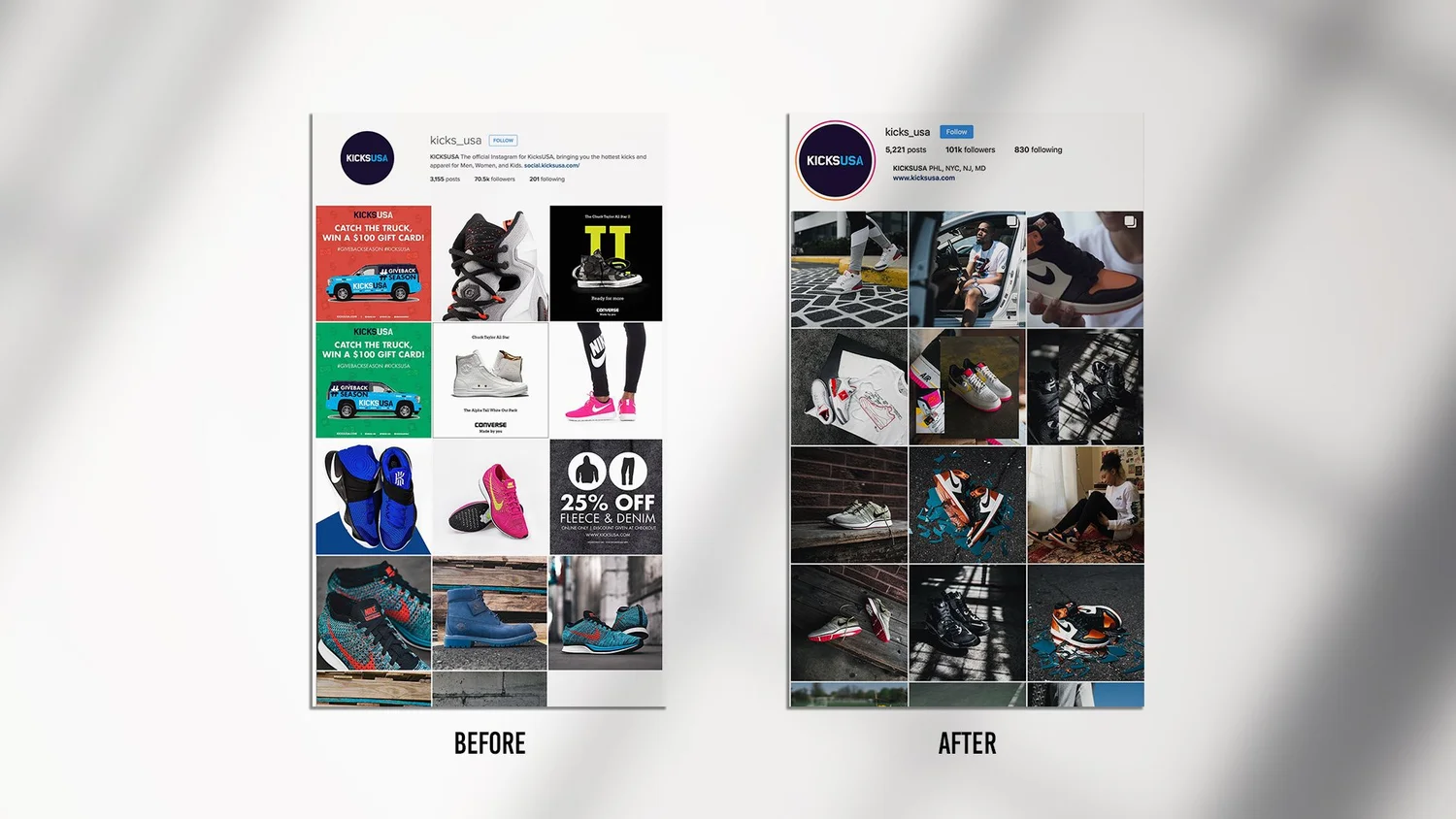
Make every slide earn the swipe
Each slide should end with a small reason to keep going. Some ways to do that:
Numbering ("3 of 7") tells people how much is left and makes them want to finish.
Open loops: end a slide on the setup and put the payoff on the next one.
Visual continuity: a line, a product or a shape that crosses from one slide into the next.
A change of pace: after three text slides, drop in a full-bleed photo.
The last slide should do one thing: save, send, comment or tap the link in bio. Pick one. "Save this for your next shoot" beats a slide with four different asks.
Build a template system, not one-offs
If every carousel starts from a blank canvas, your feed will look like it. I build each client a small carousel system:
A cover template for each content pillar (tips, product, story, behind the scenes)
Body slide layouts for text-only, image plus text and full-bleed image
A closing slide with one call to action
Fixed margins, type sizes and colors
That's the difference between a feed that looks busy and one that looks like a brand. I wrote more about this in how to build a social media content system.

Write the caption for the swipe
The caption isn't decoration. Start it with a line that adds to the cover instead of repeating it, then tell people what's inside ("7 slides, the last one is the one everyone skips"). Put the keywords people search for in the first line too: Instagram search reads captions, so "Philadelphia product photography tips" in the caption helps the right people find it.
What to measure
Likes are the weakest signal on a carousel. Watch these instead, in Instagram's insights for each post:
Saves: did it work as a reference?
Shares and sends: did people pass it on? This is the one Instagram says it weighs heavily.
Reach from non-followers: is it finding new people?
Profile visits and follows from the post: did it make anyone care who made it?
Compare carousels against each other, not against your Reels. Keep a simple sheet: cover formula, slide count, layout type, saves, sends and reach. After 10 to 15 posts, the pattern for your audience usually shows up.
Common carousel mistakes
A cover that only makes sense after you've seen slide 2
Text that's too small to read without zooming
Ten slides of text with no images
Different fonts and colors on every post
Important text in the corners, under the username or the dots
A closing slide with five calls to action
Square slides in a 4:5 world
Instagram carousel FAQ
What size is an Instagram carousel?
1080 x 1350 pixels (4:5) is the best size for most carousels. Square 1080 x 1080 also works. The first slide sets the shape for all of them.
How many slides can a carousel have?
Up to 20 photos and videos in one post. Most carousels perform best between 5 and 10 slides, depending on the content.
What should the first slide of a carousel say?
One clear promise or hook in 3 to 8 words, readable at phone size. It should make people want slide 2, not explain everything.
What fonts work best for carousels?
Clean, heavy headline fonts and a simple body font, in your brand's typefaces. Size matters more than the font: keep body text at 34 px or larger on a 1080 px slide.
Do carousels get more reach than Reels?
They do different jobs. Reels usually reach more new people, while carousels tend to get more saves and deeper engagement from people who already follow you. A good feed uses both.
Can I mix photos and videos in a carousel?
Yes. Keep them all the same shape (export video at 4:5 to match 4:5 images) so nothing gets cropped.
Need carousels that look like your brand?
I design carousels, templates and full content systems for brands, creators and businesses in Philadelphia and beyond, and I shoot the product and lifestyle photos that go in them. See the work on my social media content page, or start a project.